
DebugShare

iPhone / iPad · iOS 26.4+

Take a screenshot.Your bug report starts.

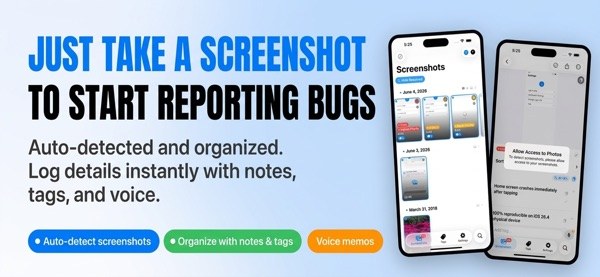
Screenshots you take are listed automatically. Add reproduction steps by text or voice, then bundle everything into Markdown or ZIP for your team.

Scan with your iPhone

DebugShare

When it helps

What it does

  1. 01

    Screenshots, listed for you

    New screenshots are detected and shown in a grid or timeline. Mark fixed ones as resolved to keep open bugs in view.

  2. 02

    Text and voice memos

    Record reproduction steps as text or a voice memo. Shake your device to bring up the latest screenshot.

  3. 03

    Automatic OCR tags

    Text in each screenshot is read with OCR and turned into tags. Filter by tag, keyword or priority (Premium).

  4. 04

    Markdown and ZIP export

    Bundle screenshots and memos as Markdown or ZIP and share over AirDrop, email, Slack and more (Premium).

  5. 05

    iCloud Drive sync

    Sync across your devices and open your reports from any of them (Premium).

  6. 06

    Works with Shortcuts

    Automate your bug-reporting steps with Apple Shortcuts.

In detail

01

Screenshots line up on their own

New screenshots are detected and listed in a grid or a timeline. Pull down on either to refresh from Photos.

  • Grid or timeline view
  • Pull down to refresh from Photos
  • Long-press for a quick action menu
02

Memos by text or voice

Record reproduction steps and notes as text or as a voice memo. Shake your device to pull up the latest screenshot at once (Shake to Share). Voice memos are free up to 3 times a day.

  • Text and voice memos
  • Shake to bring up the latest screenshot
  • Unlimited voice memos need Premium
03

OCR tags and filters

Text inside a screenshot is read with OCR and tagged automatically. Search runs across memo text, OCR text and tag names, and you can filter by tag, keyword or priority.

  • OCR auto-tagging (Premium)
  • Search across memos, OCR text and tags
  • Tag management
04

Export as Markdown or ZIP

Bundle screenshots and memos into Markdown (.md) or a ZIP archive of images and memos. Hand them to your team over AirDrop, email, Slack and more.

  • Markdown (.md)
  • ZIP archive (images + memos)
  • Export needs Premium
05

Resolved marks and the widget

Use the seal icon in the detail toolbar to mark a screenshot as resolved, and toggle resolved items on or off in the list. The widget shows the count of open bugs.

  • Resolved mark
  • Show or hide resolved items
  • Open-bug count in the widget

How it works

  1. 1

    Take a screenshot

    Take a screenshot as usual. It appears in the list when you open the app. If it does not, pull down on the list to refresh.

  2. 2

    Add memos and tags

    Open it from the list and note the reproduction steps as text or a voice memo. Tags and priority can be added too.

  3. 3

    Find it, then resolve it

    Search or filter to find the screenshot you want. When the bug is fixed, mark it as resolved from the detail toolbar.

  4. 4

    Export and share

    Export as Markdown or ZIP and share over AirDrop, email, Slack and more (Premium).

Screens

The screenshot list and a memo screen

FAQ

Who is it for?

iOS and mobile developers, QA engineers and testers, and teams that want to spend less time on bug reports.

Is it free?

The app is free to download. OCR auto-tagging, Markdown / ZIP export, iCloud Drive sync and unlimited voice memos are Premium features, bought in the app.

Is it a subscription?

No. Premium is a one-time in-app purchase. There is no subscription.

How many voice memos are free?

Up to 3 a day for free. Premium makes them unlimited.

Which export formats are there?

Markdown (.md) and ZIP archives containing images and memos.

Can I use it on several devices?

iCloud Drive sync, a Premium feature, syncs across your devices.

Is my data sent to the developer?

No. Personal data is not collected or sent to the developer or third-party servers. It stays on your device, or in your own iCloud account if you use iCloud sync.

Which OS does it need?

iOS 26.4 or later on iPhone and iPad.

Note the next bug the moment you capture it.

Download on the App Store
DebugShareGet